Screens
Inventory
The Inventory page lists everything you own, wherever it is, and is where you sell spares, scrap what you do not need and earn scrap points.
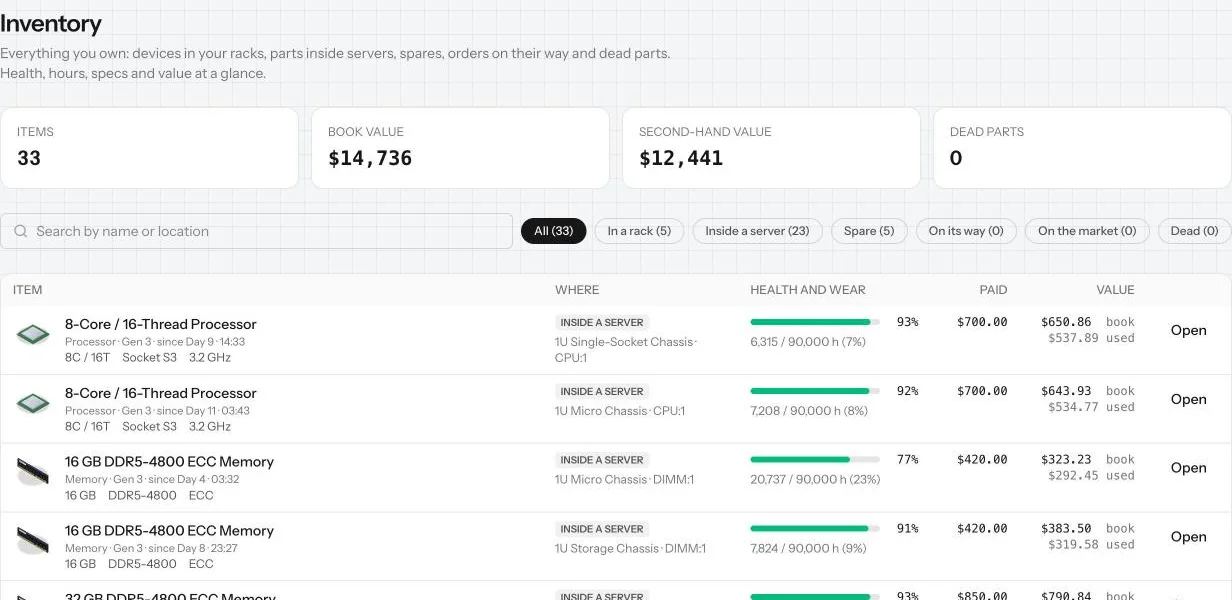
Inventory is your warehouse list. Every piece of hardware your company owns appears here once, with where it is, how healthy it is and what it is worth. Open it from Inventory in the status bar.
The numbers at the top
- Items: how many things you own.
- Book value: what they are worth on your books: what you paid, reduced by wear.
- Second-hand value: roughly what they would fetch on the market today.
- Dead parts: failed parts you have not got rid of yet.
Filters
Narrow the list with the buttons or search by name or location:
- In a rack: devices mounted in a cabinet.
- Inside a server: processors, memory, disks and cards fitted in a chassis.
- Spare: things not in use. These are what technicians use to replace failed parts.
- On its way: orders still being delivered, with when they arrive.
- On the market: things you have listed for sale.
- Dead: failed, burned or flooded parts.
Each row
The list starts with the worst health, so what needs replacing is at the top.
- Item: the product and its specs. Hardware you bought on the second-hand market carries a Second-hand tag.
- Where: the server, cabinet and datacenter it is in, or "spare". Open jumps to the server on the Nodes page.
- Health and wear: a health bar and the hours it has run against its expected life.
- Paid and Value: what you paid, its book value and its second-hand value.
Dead parts
A failed part stays in your inventory until you deal with it. It cannot be sold. Recycle sends it to the recycler; Recycle all does every dead part at once. A working spare you no longer need can go the same way with Scrap, after you confirm. Both are free and cannot be undone.
Scrap points
Recycling and scrapping earn scrap points: one for every $10 of the part's list price, at least one. The button shows how many points you get. Each point is worth $0.10 off a Vendor shop order, up to 10% of the order: tick Use scrap points when you order. The Scrap points card at the top of the page shows your balance and what it is worth.
Selling spares
A spare you bought new has a Sell button right in its row (the inventory panel on the Racks page has one too). It opens the sale panel with the fair price to start from and lists the item on the second-hand market. Hardware you bought second-hand, and the parts that came inside it, cannot be resold: use it, or scrap it.
The store room
You can hold at most 50 loose items at once: spares, orders on their way, things listed on the market and dead parts. Hardware that is racked or fitted inside a server does not count. Premium raises the limit to 75. When the store room is full, sell, scrap or recycle something before you buy more.
Tip: Keep a few spare disks and a spare power supply of the models you use most. Your technicians can only replace a failed part when a matching spare is in stock.
Common mistakes
- Selling your last spare disk, then waiting on a delivery when one fails.
- Letting dead parts pile up: recycle them for scrap points, and to free room in the store room.
- Buying cheap second-hand parts to sell on: second-hand hardware cannot be resold.
- Forgetting things listed on the market: they still count as yours until sold.
Want the numbers? The full rules: Vendor shop and second-hand market