Screens
Vendor shop
The Vendor shop sells brand-new hardware: chassis, processors, memory, disks, network gear, power and cooling. How to read it and what to buy first.
The Vendor shop is where new hardware comes from. Everything here is brand new: full health, zero hours of wear. Money spent here leaves the game; nobody receives it.
Categories
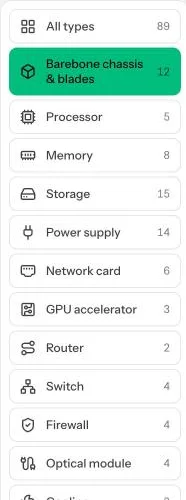
On the left, every category with how many products it has: barebone chassis and blades, processors, memory, storage, power supplies, network cards, GPU accelerators, routers, switches, firewalls, optical modules, cooling, UPS units, power strips and more. Click one to see its products.
Every category starts with a short buying guide in green: what to check before you buy. Read it the first time; it saves wrong purchases.

Reading a row
- Item: the product, with a picture. Hover it for details.
- Specs: what matters for that kind of part. For a chassis: sockets, memory slots and speeds, drive bays and their size, M.2 slots, expansion slots, power supply bays and onboard network ports.
- Stands out: tags such as Cheapest, Redundant PSU, Most sockets, Most memory slots or No M.2 slot.
- Gen: the hardware generation. Newer is faster and more efficient.
- Power: what it draws.
- Price and Buy new.
Buying
Click Buy new, choose a Quantity (1 to 10) and confirm. If you have scrap points, tick the box to use them: each point takes $0.10 off, up to 10% of the order. You earn points by scrapping and recycling parts on the Inventory page. While you only rent space, orders arrive within seconds. Later in the game (see Eras), orders are delivered: most in a couple of hours, the biggest items in a day or two. Deliveries on their way show in the dock at the bottom of the screen and under On its way in Inventory.
A chassis you buy opens straight on the Nodes page so you can start fitting parts.
What to check
- Processor: its socket must match the chassis. Threads are what you sell as virtual processors.
- Memory: type and speed must be ones the board takes, and every stick in a server must be the same speed.
- Disks: the bay size (2.5" or 3.5") or an M.2 slot for NVMe. Buy identical disks if you want RAID.
- Power supply: more watts than the server draws, and a second one for redundancy.
- Network gear: port speeds that match your uplink and switches.
The game only lets you seat parts that fit, but it cannot stop you buying the wrong one.
Vendor or second-hand?
New parts last longest. The second-hand market is cheaper, has older generations the vendor no longer sells, but its parts have already worn.
Common mistakes
- Buying a processor for the wrong socket.
- Buying memory of a different speed than what is already in the server.
- Buying a big 4U chassis first: it needs much more power and space.
- Forgetting your scrap points: they only count when you tick the box on the order.
Want the numbers? The full rules: Vendor shop and second-hand market