Getting started
Your first hour
From a brand-new company to a server that is built, racked, online and selling, step by step, with the mistakes new players make most.
You start with some cash and an empty company: no servers, no space, no customers. This page takes you from there to one server running in a rented cabinet that customers can buy. While your company is new, everything you order arrives at once and hands-on jobs finish straight away, so you can do it all in one sitting.
The order matters: server, then space, then network, then sales. Each step needs the one before it.
1. Buy an empty server
A server starts as a barebone chassis: the metal case with the motherboard inside, but no processor, memory, disks or power supply. You choose those yourself, which is what makes every server yours.
On the Nodes page, click New device. The Vendor shop opens on the chassis list.
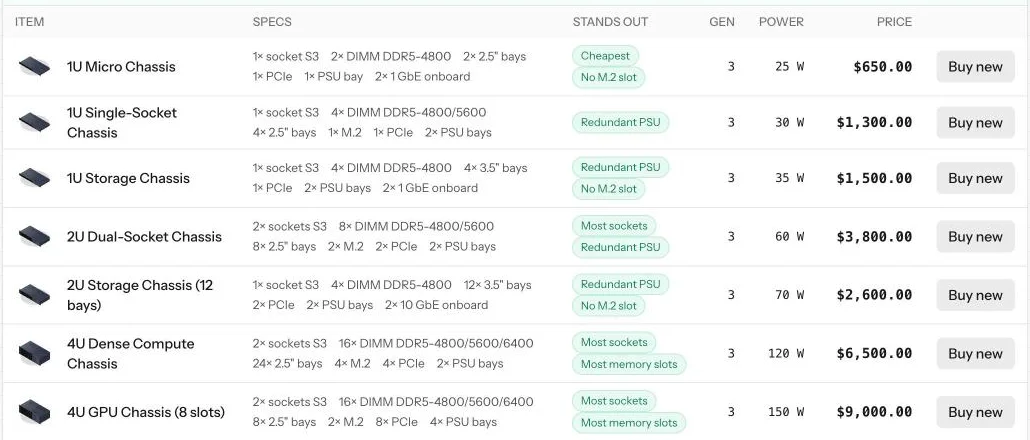
How to choose your first one:
- Small (1U) chassis are cheap and take one unit of rack space. Perfect to start.
- Look at the Specs column: how many processors (sockets), memory slots and drive bays it has. More slots means you can grow the same server later.
- Tags in Stands out help: Cheapest, Redundant PSU (room for a second power supply), No M.2 slot (no small fast disks).
- Bigger 2U and 4U chassis hold much more, but cost more and need more space and power. Save them for later.
2. Put the parts in
After buying, the chassis opens on the Nodes page as a picture of its inside. Click an empty spot and pick a part. Parts you own are listed first, and you can also buy and fit a new part in one click.
A server needs four things before it can start:
- A power supply. Without it nothing turns on.
- A processor. It must fit the chassis socket; the game only offers ones that do.
- At least one memory stick. It must be the type and speed the board takes.
- At least one disk. That is where the operating system and your customers' data live.
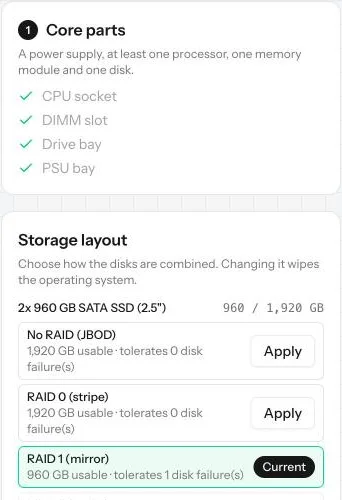
The Core parts checklist on the right ticks each one off as you go.
Tip: A slightly bigger processor or more memory directly means more customers on the same server. Memory usually runs out first.
3. Choose a storage layout, then an operating system
If you put in two or more identical disks, choose how they work together under Storage layout (see Storage layouts). With one disk there is nothing to choose.
Careful: choose the storage layout before the operating system. Changing it later wipes the server.
Then install an operating system. It decides what you can sell on this server:
- Linux (free) for web hosting, or for renting out the whole server.
- Hypervisor (monthly license) to split the server into virtual servers (VPS).
When the server shows Bootable at the top, it is ready for a rack. Operating systems lists every choice.
4. Rent a cabinet
Your server needs a home with power and internet. Open Colocation: it lists datacenters all over the world that rent out space.
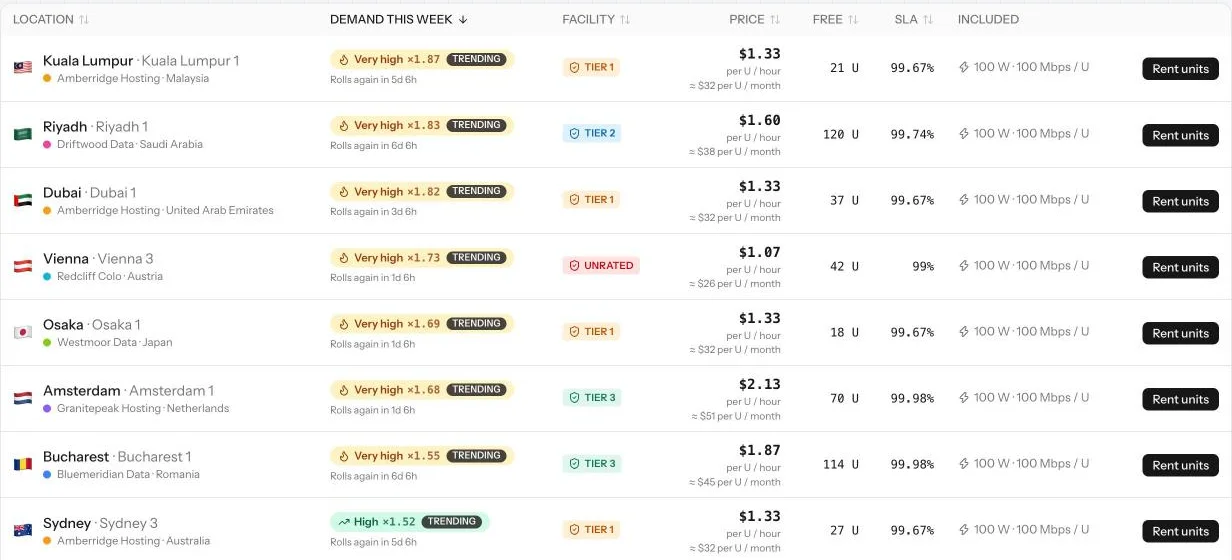
What to look at:
- Demand this week: how many customers that city brings. Higher demand sells more. It changes every week.
- Facility (tier): how well the building handles power cuts, fires, floods and break-ins. Unrated is cheapest and riskiest; Tier 3 is the safest and the most expensive.
- Price: rent per unit per hour. You pay a day up front, then by the hour.
Rent at least two units: one for the server and one for a switch. You can always add more units later.
5. Buy a switch
Servers do not plug into the internet directly. They plug into a switch, and the switch plugs into the internet line. The small 8-port switch in the Vendor shop is enough for a first cabinet.
6. Mount everything
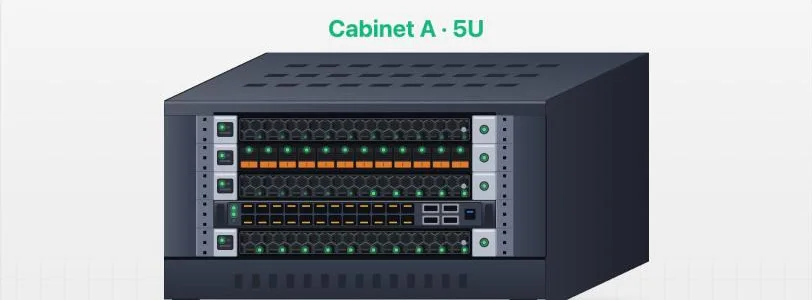
Open Racks. Your cabinet is drawn with its empty units. Click an empty unit and choose the server or the switch from your inventory; do both. If a device does not fit where you clicked, it goes to the nearest free space. You can drag devices around later.
7. Plug in the cables
In the Network panel under the cabinet (see Networking), first cable the switch to the uplink (the internet line), then cable the server to the switch. A device is online only when there is a path from it to the internet.
8. Put it on sale
Open Sales, create a group that matches the operating system you installed, and add your server to it. Then bring visitors in: nobody finds a new hosting company without marketing. A small daily ad budget is the quickest start. The Sales and Marketing pages explain all of it, and Your first customers covers what comes next.
Done. Open Overview and watch the log: new customers appear there as they sign up.
Common mistakes
- Installing the operating system first, then changing the storage layout. The server is wiped. Pick the layout first.
- Renting only one unit. Then there is no room for the switch, and the server can never go online.
- Forgetting the switch's own cable. Server to switch is not enough; the switch must reach the uplink too.
- Putting a Linux server in a VPS group. VPS needs the Hypervisor. The game tells you, but it is the most common surprise.
- No marketing. A perfect server with no ads or SEO gets no visitors at all; blog posts only multiply those.
- Running out of cash. Rent is taken every hour. If you cannot pay, the cabinet's servers are switched off until you can.
Want the numbers? The full rules: Your first day