Your datacenter
Cabinets
A cabinet is the rack your servers live in. It comes with power, cooling, an internet line and a few IP addresses, each with limits to watch.
A cabinet is a tall rack of shelves measured in units (U). A small server takes 1U, bigger ones 2U or 4U, and switches, firewalls and other gear take space too. You start by renting a cabinet in someone else's datacenter; later you can build your own.
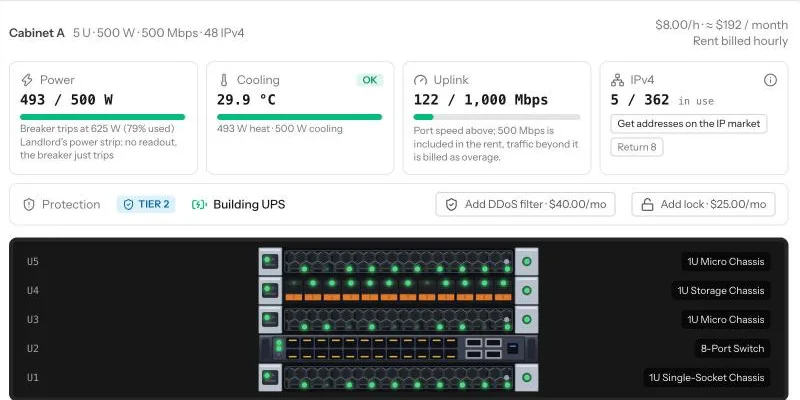
On the Racks page, Floor view shows your cabinets as pictures, and Rack view shows the details. Above each cabinet in Rack view there are four boxes: power, cooling, uplink and IP addresses.
Renting and growing
When you rent, you choose how many units you need. Rent is charged every hour; the first day is paid up front.
- Expand a cabinet when it is full. Every unit you add also brings more power and cooling.
- Add a cabinet in the same or another datacenter to spread your servers and your risk.
- Move a device by dragging it to another free spot.
- If rent cannot be paid, that cabinet's servers are switched off until you pay. Leave it unpaid too long and you are evicted: your hardware comes back to your inventory.
Power
Every unit you rent includes some electricity (Power and cooling has the full story). The bar shows how much your hardware uses right now. Busy servers use more than idle ones, so the number moves during the day.
- Use more than included and the extra is billed.
- Go far over and the breaker trips: the whole cabinet goes dark for a while.
- A metered power strip (PDU) shows the load and warns you before the breaker trips. A switched one turns off the newest server instead of letting the whole cabinet go dark.
Cooling
Everything that uses power gives off heat. The cabinet's own cooling handles the heat of the power it includes, so most cabinets never need more.
- If you push past that, the cabinet runs warm, then overheating, and parts break much sooner.
- A rack cooling unit adds cooling, but only helps once the heat is above what the cabinet already handles. The Cooling box tells you when one would have nothing to do.
- An environment sensor warns you before the cabinet gets warm.
Uplink
The uplink is the cabinet's line to the internet (see Networking). All your customers' traffic shares it, and traffic above what the rent includes costs extra.
- When the line is full, everything gets slow and customers start leaving.
- DDoS attacks flood the line. A rented DDoS filter stops them up to its size (1, 5 or 10 Gbps), and a firewall with intrusion prevention in the cabinet stops them too.
The Network traffic panel next to your cabinets shows the traffic over the last day, attacks included.
IP addresses
Every VPS and dedicated customer needs an address of their own (web hosting customers share one). See IP addresses. Each cabinet starts with a small block. When it runs out, you cannot sell more VPS or dedicated servers in that cabinet until you buy more addresses on the IP market.
The Network panel
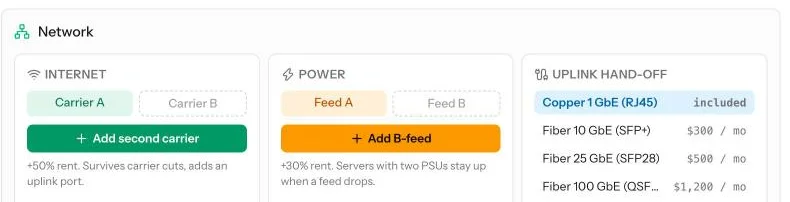
Under each cabinet, the Network panel is where devices are cabled, and where you add backups for the things that can fail.
- Cabling: switch to the uplink first, then each server to a switch port. A device is online only when it has a path to the internet.
- Second carrier: a second internet line, so one cut does not take you offline.
- B-feed: a second power line. Servers with two power supplies keep running when one feed drops.
- Fibre hand-off: a faster line to the internet, for when your customers outgrow the basic one.
Protection
Above the cabinet you can also add:
- a lock, so burglars cannot walk off with your parts,
- a DDoS filter against small attacks.
The building's tier decides the rest (see Datacenter tiers): a Tier 3 datacenter has its own generators and survives floods and quakes that would darken a cheap one.
Common mistakes
- Filling every unit, then having no room for a switch or a firewall.
- Ignoring the power bar until the breaker trips at the busiest hour.
- Buying a cooling unit for a cabinet that is not even warm.
- Running out of IP addresses and wondering why VPS plans stopped selling.
Want the numbers? The full rules: Power, cooling and climate